Second insight of the day
It’s time for my favorite thing. Let’s have a Python packaging rant.
Most people know that the Python world’s approach to packaging and
distribution is best summarized, and probably directly inspired, by
xkcd.
A long time ago, the decision was made, or accepted by mutual apathy,
how installation tools like pip and the late, unlamented
easy_install would find packages:
- Predict the file name (possibly more than one).
- Load an HTML page.
- Check every
<a> on that page.
- Use the one that points at the most preferred file name variation.
The only thing in the page that is at all interesting in this model
are the //a/@hrefs. Everything else is noise.
Enter pip 22.0, released ~2 days ago. It now uses a different parser
for HTML pages than previous versions. Instead of the certainly
entirely overpowered html5lib, whatever that is, it is now using
something else, apparently called html.parser.
Remember, the approach to looking up download links for package files
consists of looking at <a> elements. Finding them in HTML, however
close to, or far from, the spec it may be, is not a big issue. (Anyone
who allows user-generated content on a download page is beyond help
anyway.)
Why, then, the switch to a parser that, in order to find <a>
elements, requires that the page have a correct <!DOCTYPE html>
declaration, i.e. the claim that it adheres to the HTML5 spec?
The HTML5 “spec” shall not be gone into here any further.
The result is pip 22.0.2, an emergency release so urgent that it could
not even be tagged in the repo before it was put on PyPI (and the tag
has still not been created as of press time). In the typical manner,
whenever it encounters a page that does not have the canonical
<!DOCTYPE> it will print a warning blaming the user for their
audacity in installing packages from sources that do not wrap their
unstructured lists of <a> elements in proper, (un)well-specified
HTML5.
Hey, PyPA, you want a proper fix for that? Publish a file. One single
file. Its name will end in “.xsd”, and it will describe how lists of
package links are supposed to look.
Ceterum censeo: This bug would have been avoided by not suggesting to
package publishers that you will accept any line noise as long as
there are <a> elements in it, then suddenly deciding that the stuff
surrounding the <a> elements really matters to you.
tl;dr: Shame on you. This took at least six minutes to write, go enjoy
it.
First insight of the day
The trials of testing
PyCharm is a great IDE for
Python development. Its support for
Django projects is really good (if
only it applied environment variables from the Django project setup to
run configurations …).
As with everything Python, the structure of Django projects is not set
in stone and everyone has their own preferred style. Mine is to have
applications in (below) a common subdirectory. Unfortunately this
means that Django’s built-in test framework (or possibly just
unittest) does not find the tests on its own and I had to invent
some complicated workarounds to automate them to my satisfaction.
This morning I discovered that all it needs to work is for me to tell
it that that common subdirectory is a module by giving it an
__init__.py.
Not surprising.
So the PHP people, in a display of cleverness akin to that generally
displayed in the development of their product, have put their
downloads behind an automated guess at the “human-ness” of the client.
This obviously broke all automated updating everywhere, including by
the FreeBSD Ports Collection. Very helpful, that.
Their bug tracker is apparently on its Christmas holiday, too.
Extremely Tenacious
Edge updates (and also others that include something called the Edge
WebView2) fail with 0x800951dd on some computers, but not others.
Hm. 9 is FACILITY_SECURITY. The event log is full of “Windows Event
Reporting”; dozens of events for each installation attempt. What is
going on?
From the log (cleverly stored in %PROGRAMDATA%) is appears that the
updater really wants to phone home, and if it cannot, it prefers to
crash. Where the security thing comes from is unclear, particularly
because 0x51dd is undocumented. Direct HTTP is blocked, so the
installer prematurely departs this mortal coil. And tries again. And
again. And again.
On computers where it works the log shows that the updater figures out
where the proxy is, so the quick fix (until I figure out how to make
the updater behave) is to tell the updater the same on the problematic
systems.
All glory to ccache!
From the poudriere logs:
| Port |
Build date |
Elapsed time |
| devel/llvm90 |
2020-09-28 |
05:52:49 |
| devel/llvm90 |
2020-10-02 |
00:17:10 |
Time saved thanks to ccache (your praise be sung in all homes!): 95.13 %, or in other words, a ~2000 % speedup.
MailItem in changing times.
According to the
documentation,
the first parameter of the Reply (and ReplyAll, and Forward)
events on a MailItem event in Outlook is “the new item being sent in
response to the original message”.
Uh, no. At least in VSTO; not sure about VBA, but I cannot see how it
could be different there given that VSTO is a wrapper around the same
COM interfaces. The argument is the original item that is being
responded to:
void OnReply(object Response, ref bool Cancel)
{
    Cancel = false;

    if (Response is Outlook.MailItem item) {
        string html = item.HTMLBody;
        int pos = html.LastIndexOf("</body>");
        item.HTMLBody = html.Insert(pos, "This is the modified item. ");
    }
}
After this handler runs, the original item that was replied to will
have the new sentence at the end, while the reply is entirely
original. I suppose this means that the response message is created
first, and then the event fires with the wrong argument.
Helpfully, though, when using Outlook’s preview/reading pane (whatever
its name is this afternoon) the InlineResponse event on the
Explorer object actually gets the correct message, i.e. the new one.
Trust Issues
After developing a new Outlook VSTO add-in, I noticed that at the
first start after installing it (by the MSI method), Outlook would
display a trust warning. The add-in is unsigned, but this should still
not happen based on my experience from other add-ins.
As it turns out, there are two ways to “grant trust to the
solution”:
- Sign the add-in
- Install it into the Program Files directory
The latter presumably works because Office assumes that write access
to Program Files is sufficient evidence of administrative intent.
My installation path was C:\Program Files\Some Company\SomeAddin.
Huh. Now what?
…
… oh no, they didn’t …
… yes, they did.
Can you guess?
S
P
O
I
L
E
R

S
P
A
C
E
OK, a hint. The “Program Files” directory?
S
P
O
I
L
E
R

S
P
A
C
E
Either you have figured it out by now, or are hungry for the
solution (because why else would you still be reading this?), so here
it is:
The “Program Files” directory they talk about is the same “Program
Files” directory that Office is installed in. My scenario involved a
.NET assembly compiled to MSIL, so naturally I put it into the 64-bit
Program Files directory because that one is more native to the system.
The Office installation, however, was still 32-bit, and Outlook came
to the (well, partially) unreasonable conclusion that:
"C:\Program Files\" != "C:\Program Files (x86)\"
Therefore the add-in was not installed in the Program Files directory,
and therefore not to be trusted by default.
A Bitmap, wrapped in a knotted Ribbon.
Writing Office add-ins has always been a bit of a dark art because
there is not really all that much documentation, and what there is,
tends to, let’s say, have been overtaken by events.
This is particularly true where VSTO, the Visual Studio Tools for
Office, otherwise known as the .NET wrappers around the COM add-in
API, is concerned. Even a seemingly simple task like finding out
correct signatures for callback methods can be surprisingly difficult
because the authoritative
page
still only mentions Office 2007, and you can never know what may have
changed in the last 13 years. (Wow. Has it been that long?)
OK, enough of the empty complaining. Let’s get to the useful
information. Everything below is based on current Office 365 with the
latest VSTO version as of today, 10.0.60724.
The loadImage callback
The correct C# signature for the callback method named in <customUI loadImage="LoadImageCallback"> is:
public Bitmap LoadImageCallback(string imageId)
There are various discussions around the Internet on whether this
method should return Bitmap or stdole.IPictureDisp, or whether
Bitmap works everywhere except Outlook.
Bitmap works everywhere including Outlook.
Namespaces and idQ
When using the idQ attribute to identify controls, you may notice
that your callbacks aren’t. Called, that is. This is explained in a
paragraph about one-third down the page linked above:
If you use a COM add-in to customize the Fluent UI, the namespace
name must be the ProgID of the COM add-in, but the behavior is
otherwise the same. When you use a shared add-in, the ProgID is
AddInName.Connect. When you use Microsoft Visual Studio 2005 Tools
for the 2007 Microsoft Office System (Visual Studio 2005 Tools for
Office Second Edition) to create the add-in, the ProgID is the
name of the add-in.
(Emphasis mine.)
VSTO is actually older than the W3C recommendation on “Namespaces in
XML 1.0”, Second
Edition,
so I have to admit that the idea did not contradict the spec at the
time. (The original recommendation from 1999 mentioned that the intent
was to use URIs, but did not yet require it.)
However, I fail to see the reason why the namespace ID must be the
add-in’s name, unless it is the result of a very ugly shortcut in the
implementation of the “Fluent” UI, i.e. the Ribbon. It would be
entirely simple for the host application to associate any string with
the add-in whose GetCustomUI() returned the particular bit of XML.
By the way, the “name of the add-in” in the VSTO case above, that the
namespace ID has to match, is the name of the subkey of
SOFTWARE\Microsoft\Office\...\Addins. In addition to being true
empirically, it also matches the non-VSTO case because the only place
where the ProgID is involved in the process of loading an add-in is
that Registry key.
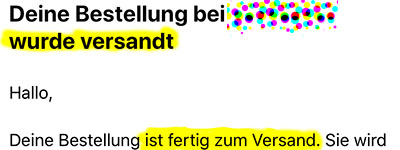
Ein Körnchen Wahrheit.
Daß Versandbenachrichtigungen immer gelogen sind, weil sie im
Zweifelsfall dadurch ausgelöst werden, daß der Aufkleber erzeugt wird,
ist ja nicht neu. Neu ist, daß jemand die Lüge aus der Überschrift
schon im ersten Satz so klar entlarvt.
Clap. Clap. Clap.
There is a new Windows 10 “functional update”, so of course we also
need new Intel network drivers for our VLANs. Intel have been really
laying on the speed this time; three weeks from general availability
(of 2004) to a driver release is a new record, I think.
Hey! Great job! Let’s all run and install the new 25.1.1
drivers
today!
Unless … you aren’t feeling particularly sentimental about the *-NetAdapter
cmdlets, are you? The ones you just got back in 25.0 after creating any VLANs
used to break them
for the longest time?
You are? Oh. Then I may have a bit of bad news for you.
Yes. They’re gone again; same error as before. Someone forgot to merge
the fix branch, I suppose.
What do I hear you say? Is it “Quick! Let everyone know! On the Intel
forum where they
announced the release and asked for feedback!”, perhaps?
Oh. Then I may have a bit of bad news for you.
You see, the Intel forums have just gone
read-only for several days
while they are “transitioning to a new platform”, which will also have a new
URL.
Great timing. Really great timing.
